MultiTaskbar
A full taskbar on every monitor for Windows 11. Pinned apps, window previews, volume and a clock on your second and third screen.
Free and open source (MIT) · a single portable exe · no installer, service or telemetry
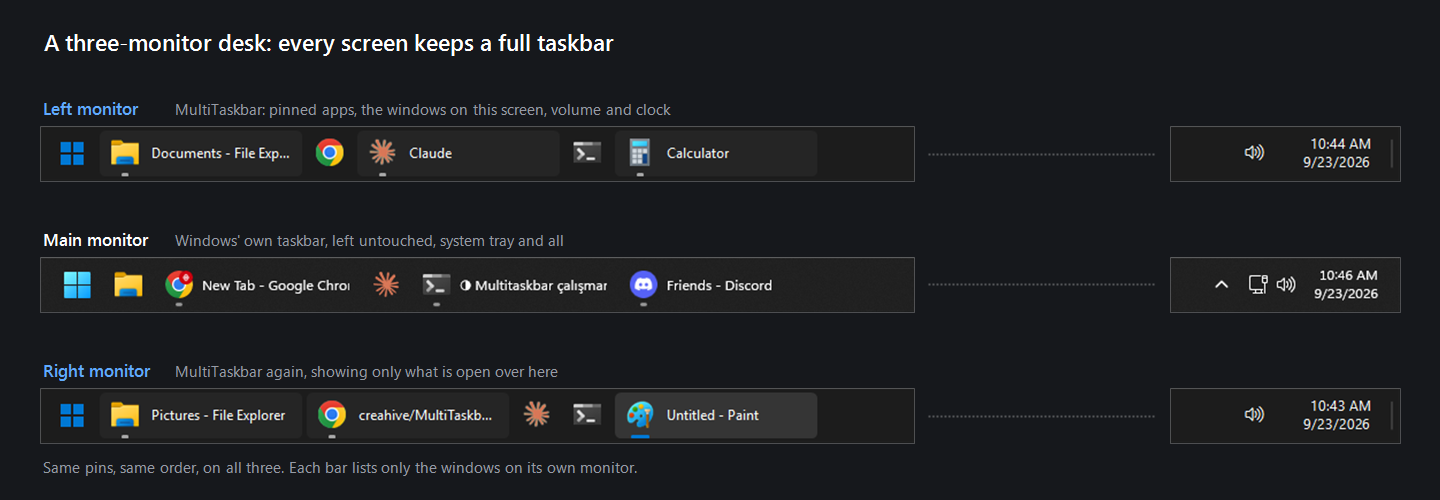
What Windows 11 leaves out
On a secondary monitor Windows 11 gives you a reduced taskbar: no system tray, no volume icon, no calendar, and pinned apps only if you also accept every window showing up on every screen. MultiTaskbar hides those bars while it runs and draws a complete one in their place.
Your pinned apps
The Start button and the same pins, in the same order as your main taskbar. Pin or unpin as usual and the bars follow.
Only this monitor's windows
With their titles, following the Windows setting for combining taskbar buttons. A window never shows up on every bar.
Live window previews
Hover an app to see its windows, drawn by the desktop compositor itself. Click one to switch, middle-click to close it.
The real right-click menu
Recent files, the window list, and Explorer's own entries: Run as administrator, Properties, Unpin from taskbar.
Volume, clock, calendar
Click for a volume slider or the month, scroll to change either, and a show-desktop strip in the far corner.
Stays out of the way
Follows your light or dark theme and accent color, scales to each monitor's DPI, and hides for full-screen apps.
Install
- Download
MultiTaskbar.exefrom the button above. - Put it somewhere it can stay, for example
%LOCALAPPDATA%\Programs\MultiTaskbar. - Run it. It asks once whether to start with Windows, and can be reached from its tray icon afterwards.
Windows SmartScreen may warn about the download, because the exe is not code-signed. Choose More info → Run anyway, or build it yourself: the whole app is one C# file, compiled by the compiler that already ships with Windows.
Questions
Does it replace my main taskbar?
No. The main monitor is untouched. A Windows taskbar on another monitor is hidden only while a MultiTaskbar bar is up on that same monitor, and comes back on exit, on a crash, or if the process is killed.
How do I remove it?
From its tray icon, from Settings → Apps, or by running MultiTaskbar.exe --uninstall.
It restores the taskbars, removes its startup entry and settings, and deletes itself.
How is it different from DisplayFusion or Actual Multiple Monitors?
Those are paid suites that also add multi-monitor taskbars. MultiTaskbar does one thing, is free and open source, and is a single exe of about 56 KB.
Does it work on Windows 10?
Yes, though Windows 10's own multi-monitor taskbar is already closer to complete, so there is less to gain.
What does it send anywhere?
Nothing but a daily question to GitHub asking whether a newer release exists, which you can turn off. No accounts, no analytics.